
Before You Deposit
- You are logged in to your own account
- Your Easypaisa or bank account is in your name
- You have read the promotion terms
- You only use money you can afford to lose
Open the Deposit Screen
Tap the green Deposit button at the top of the home screen. Right after registration you can also tap Deposit Now in the “Registration Successful” pop-up.
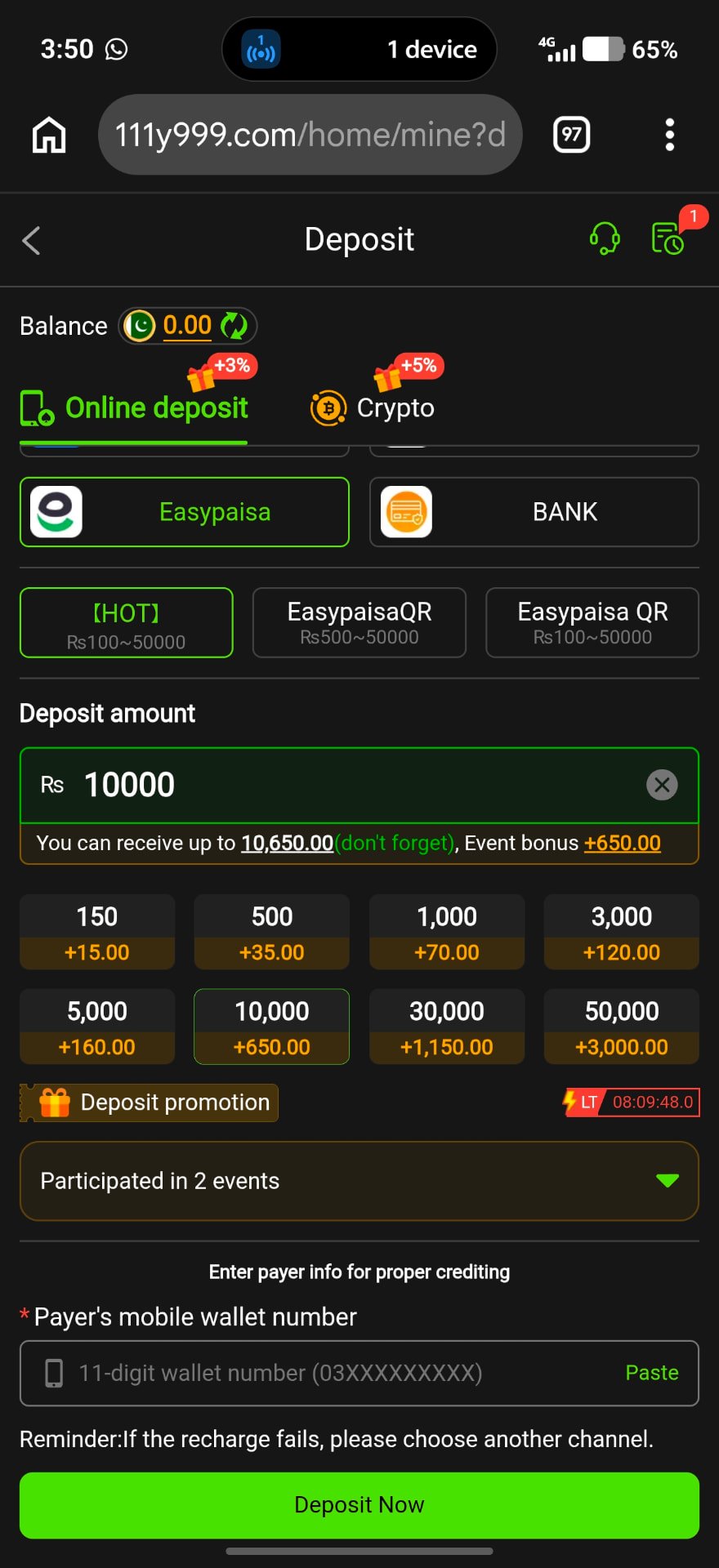
Deposit Methods
Online deposit
Easypaisa channels (HOT, EasypaisaQR, Easypaisa QR) and BANK. Each channel shows its own range, e.g. Rs100–50,000 or Rs500–50,000.
Crypto
A separate tab for crypto deposits. Double-check the network and address before sending.
Step-by-Step Deposit
- 1
Pick a channel
Select Easypaisa or BANK, then a sub-channel within your amount range.
- 2
Enter amount
Type the amount or tap 150, 500, 1,000, 3,000, 5,000, 10,000, 30,000 or 50,000.
- 3
Check the bonus line
The screen shows “You can receive up to …” and any event bonus. These are operator offers and can change.
- 4
Enter payer wallet number
Type your 11-digit number (03XXXXXXXXX) so the payment is credited correctly.
- 5
Tap Deposit Now and pay
Complete the payment in your wallet and keep the transaction ID.
Deposit Failed or Not Credited?
- The app reminds you: if recharge fails, choose another channel.
- Wait a few minutes and refresh your balance.
- Send the transaction ID to in-app support.
- Never send money to a number given in a private chat.
Frequently Asked Questions
It depends on the channel; the screen showed ranges starting at Rs100 or Rs500.
Yes, Easypaisa channels were listed under Online deposit at the time of writing.
No. Event bonuses are set by the operator and have their own terms.